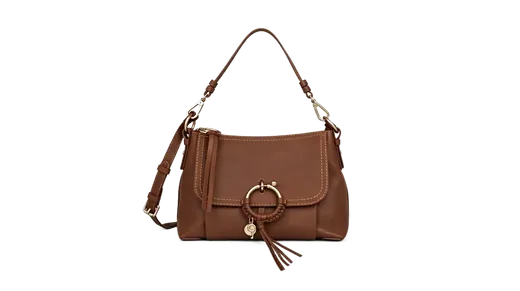
Marketplace-ready white backgrounds
Export clean cutouts that meet Amazon and Shopify image guidelines without a studio.
Remove backgrounds, swap scenes, and clean watermarks for Amazon, Shopify, and marketplace listings — in minutes, not hours.
Export clean cutouts that meet Amazon and Shopify image guidelines without a studio.
Swap plain backdrops for contextual scenes that help shoppers visualize your product.
Process SKUs one at a time in the browser — no Photoshop license required.
Amazon, Shopify, and most marketplaces judge a listing in a second: is the product isolated, is the crop honest, is the background consistent with the rest of the catalog? A lifestyle shot from a supplier folder often fails that spec. It has a warehouse wall, a competitor sticker, or a watermark from the factory photo studio. Buyers read that as unfinished inventory. Clean cutouts and a single backdrop language (white, brand color, or one lifestyle set) make a 20-SKU shop look like one brand.
Backgroundcanvas is the browser step between the phone photo and the listing form. Use background removal for a transparent PNG or a studio color. Use watermark removal only on images you own or are licensed to edit — stripping a stock watermark does not create a license. Then upload to your store. You still write titles and alt text; the tool does not replace catalog work.
Main-image rules on large marketplaces usually want the product occupying most of the frame, a light background, and no badges. After cutout, place the PNG on pure white or a very light grey if white-on-white products disappear. Shoes and bottles need the contact shadow: if the AI flattens the base, sit the PNG slightly above a soft shadow in your editor rather than leaving a floating object. Jewelry and lace: zoom the compare slider on chains and mesh before you download. If a clasp vanishes, reshoot on a contrasting cloth; no remover can invent metal that was never in the file.
Keep a SKU naming pattern: sku-main-white.png versus sku-lifestyle.jpg. Variation images can use a swapped scene so shoppers see scale (mug on a desk, lamp in a corner). Generate or pick one room style and reuse it across the line so the gallery does not look like five different apartments.
A contextual background helps when the product is generic on white (plain boxes, cables, refill pouches). Swap after you have a clean cutout, not before. If you swap first, the new texture sticks to the edge and a second cutout looks chewed. For apparel, watch mannequin stumps and hanging loops; they are honest parts of the product. Removing them can make the garment look like a ghost. For food, keep crumbs and glaze that are part of the dish; only strip the table clutter and logos.
Do not fake certifications, fake bestseller bursts in the photo, or other people's brand marks. Those belong in copy or official badge programs, not in a generated backdrop. If a supplier PNG still shows another seller's URL in the corner, that is a watermark job on files you are allowed to clean — plus a conversation with the supplier about master files.
Process one SKU at a time in the browser: upload, compare, download, next. That sounds slow until you count the hours of layer masks on a 40-item drop. Assign one person to edge QA (slider at hair, fur, and transparent packaging) and another to listing copy. Credits are per task; batch the same backdrop so you are not re-deciding the scene for every SKU. Daily check-in credits cover tests; paid packs cover a launch week.
When a listing is rejected for background or text-on-image, read the policy line, then fix the file — do not add more graphics. Backgroundcanvas will not put your logo on the main image for you, and you should not use text-removal to hide required legal marks on packaging that must remain visible. Clean the photo; keep the product truthful.
Yes. Use Background Removal to export a transparent PNG cutout, then upload to your store.
Our AI handles intricate edges like chains and lace. Use the compare slider to verify before download.
Clean product photos are standard on major marketplaces. You are responsible for owning rights to your source images.
Export a transparent PNG for your archive and for stores that accept it. Flatten to JPG on white when a channel requires a single opaque main image. Keep both files named by SKU.