Social Media
MLS Listing Photos: Cut Clutter Without Fake Staging
Improve real-estate listing photos with AI background cleanup: tidy cluttered rooms, soften harsh windows, keep architecture honest, and export HD MLS-ready st…
Written by Backgroundcanvas Editorial, the team that builds these image tools. We disclose that affiliation here. Platform sizes and rules below come from the linked official docs, not from a lab bake-off.
Buyers swipe listing photos in seconds
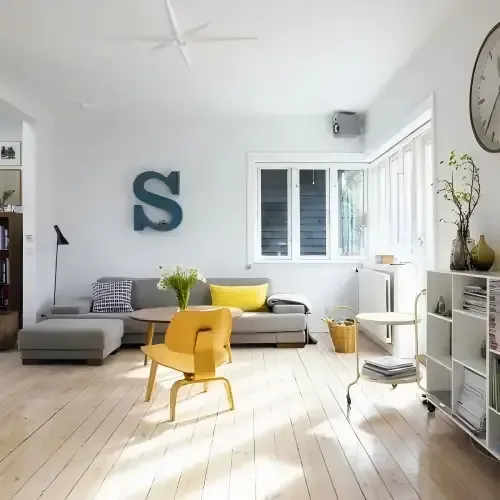 Before
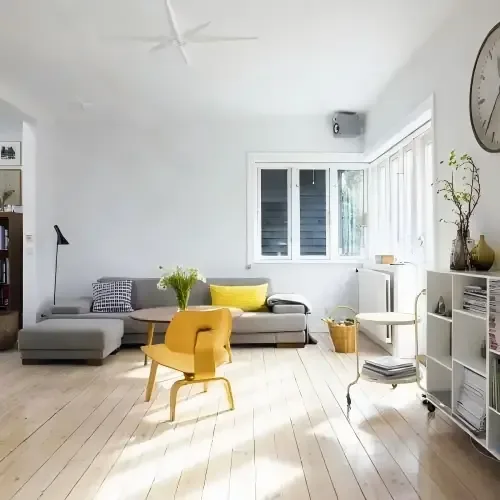 After
After
An occupied house on listing day still has a laundry basket, a TV glare, and a moving box in the hero living room. Reshooting after the truck leaves is ideal. Reality is a smartphone set from yesterday and a go-live time tonight. The job is to isolate the room you actually photographed — walls, windows, floor — from clutter that will not be there at showing, without inventing a kitchen the property does not have.
Cut clutter; do not invent millwork
Upload the widest sharp frame. Run background removal when the subject is a sofa or a fixture you need as a cutout; for whole-room listing heroes, you are usually cleaning a still, not extracting a product. Inspect window edges and floorboards at 100%. A reconstructed rug that does not match the rest of the pile is a tell. Shopify’s photography guidance still applies here in one line: people look at the picture before the remarks. They also compare the photo to the showing. NAR’s Code of Ethics requires honesty in advertising; many MLS rules treat undisclosed virtual staging as a problem. If you swap a wall scene or drop in furniture that is not in the house, disclose it in the remarks the way your board requires. If you cannot disclose, do not swap — only remove a basket that will be gone. Ceiling fans, recessed lights, and window muntins are architecture: leave them even if a buyer might prefer a different fixture.
Files, time, and broker marks
Uploads: JPG, PNG, WebP, AVIF, 10MB, 6000×6000 px. A 3000 px interior JPEG under 4MB typically returns in under 60 seconds. MLS portals compress; export a high-quality JPEG of the finished still, keep the PNG if you isolated a fixture. A broker’s preview watermark on a photo you own is a watermark-removal pass after the room is clean. A portal watermark on a competitor’s listing is not your file.
Twilight, HDR, and when to stop
Skip the tool on 32-bit HDR merges that already posterize the sky, on rooms shot at 0.5x ultrawide with bent door frames, and on files you do not own. Twilight composites that invent a sunset the evening did not have are a separate ethics conversation — this page will not do that for you. Keep a dated folder of “as-shot” and “cleaned” so your broker can answer a complaint with the original. If the listing photographer already delivered a clean set, use that set; reconstructing a phone snap is for the day the truck has not left.
Verticals, kitchens, and vacant homes
Kitchens sell houses and punish fakery: do not clone a second island. Vacant rooms look empty; that is honest. If your office uses a “virtually staged” badge, apply it in the MLS fields, not by hoping nobody notices the rug. Bathrooms with mirrors will show the photographer — crop tighter or reshoot; reconstruction of a whole reflection is a tell. Exteriors: isolate a trash bin at the curb if it will be gone, but do not paint out a neighboring wall that is in the survey. Cars in the driveway that belong to the seller can go if they will not be at showing; a neighbor’s car on the street is usually not yours to erase.
Hero versus secondary rooms, and portal compression
Shoot a sequence: living hero, kitchen, primary bedroom, bath, then details. Clean the hero first — that is the swipe that stops a buyer. Secondary rooms can stay slightly lived-in if the clutter is furniture that conveys. MLS and Zillow-style portals recompress; export a high-quality JPEG from the HD download, not a 1200 px social crop. Name files `123-main-st-living-clean.jpg` versus `123-main-st-living-as-shot.jpg` so a complaint can be answered with the original. Pets in frame are a taste call: some buyers love them, some filters skip them. Do not reconstruct a pet that was never there.
Rights, co-listers, and when to stop
Only edit photos you shot, that the listing photographer licensed to the office, or that the seller supplied in writing. A co-lister’s watermarked preview is not your file until they send a clean export. Skip 0.5x ultrawide rooms that already bend door frames, skip HDR skies that already band, and skip twilight composites this page will not invent. If the “clutter” is a structural crack, a stain, or a missing cabinet door, leave it. Cleanup is for objects that will be gone at showing, not for defects.
When the listing goes live at 9 a.m. and the hero still shows last night’s pizza box, clean the clutter you will actually remove before showing, export the JPEG, and leave the architecture as it is.
Friendly links: NAR Code of Ethics, Shopify product photography guide.